
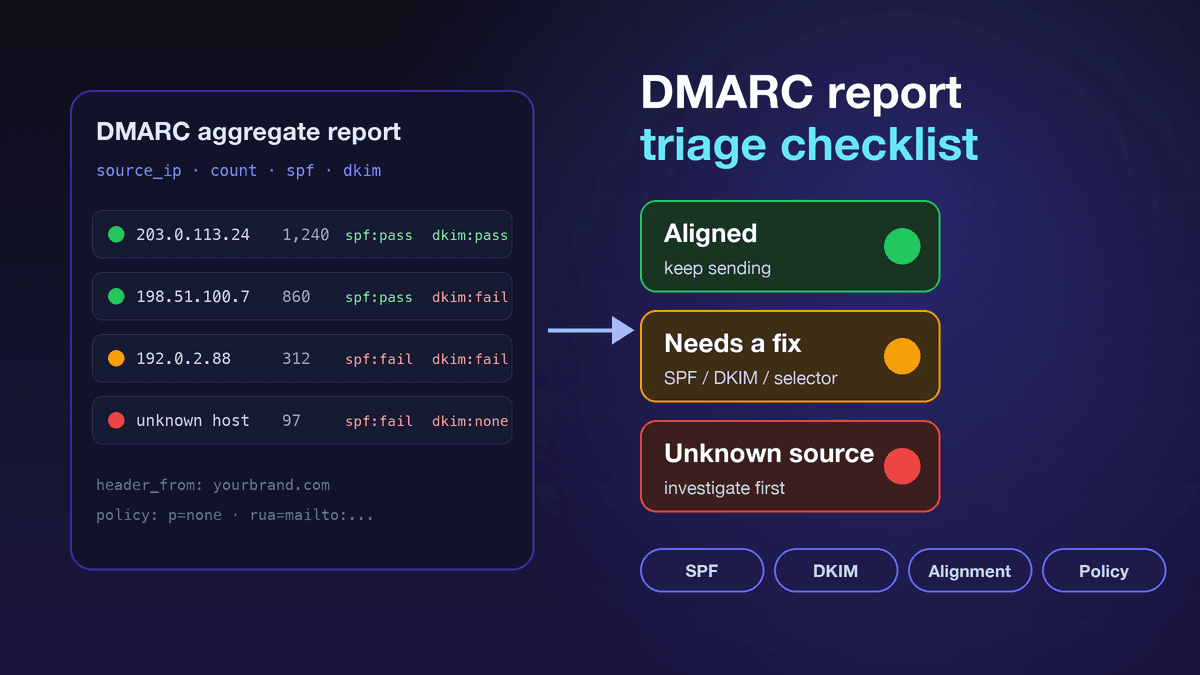
A DMARC report checklist turns the XML files mailbox providers send you into decisions: which systems send as your domain, which of them pass SPF or DKIM in alignment with your visible From address, and whether anything unknown needs to be stopped before the next campaign. For a small business, that is the difference between publishing a DMARC record once and actually knowing who is sending email in your name.
Most small businesses treat DMARC as a DNS checkbox. They publish a record, pass a setup screen and move on. That is only half the work. The other half is reading the aggregate reports that the record asks receivers to send, and acting on them.
Email problems usually start quietly. A forgotten CRM still sends from the domain. A website plugin uses the wrong mail server. A marketing platform signs with its own domain instead of yours. A staff member routes campaigns through a tool nobody approved. The mail still goes out, but authentication and reputation signals weaken, and nobody notices until open rates drop.
The short answer
To triage DMARC aggregate reports: list every sending source, mark each one authorized or unknown, check SPF and DKIM results, confirm that at least one of them aligns with the visible From domain, flag unknown IPs and services, review what your policy did to failing mail, rank fixes by business risk, then compare the next reports before you raise send volume or tighten policy. DMARC does not guarantee inbox placement, but it shows authentication problems early, while they are still cheap to fix.
Why DMARC reports matter now
Gmail and Yahoo have made authentication hard to ignore. Gmail's sender guidelines require every sender to set up SPF or DKIM, and senders of more than 5,000 messages a day to Gmail accounts must set up SPF, DKIM and DMARC (a policy of p=none is accepted). For direct mail, the domain in the From header must align with either the SPF domain or the DKIM domain to pass DMARC. Both Gmail and Yahoo also ask senders to keep the spam rate below 0.3%.
Yahoo's Sender Hub adds a practical detail: bulk senders should publish a DMARC policy of at least p=none, and including an rua tag that receives reports is strongly recommended so you can monitor the mail stream. Relaxed alignment is acceptable.
So "SPF exists" and "DKIM exists" are no longer enough. You need to know which systems actually send, whether they are authorized, and whether their authentication aligns. That is exactly what the aggregate reports tell you. If you are still setting up the records themselves, start with our guide to DKIM, SPF and deliverability, then come back to this checklist.
Step 0: Make sure reports are arriving
Reports only arrive if your DMARC record asks for them. A minimal monitoring record looks like this:
v=DMARC1; p=none; rua=mailto:dmarc-reports@yourbrand.com
Publish it as a TXT record at _dmarc.yourbrand.com, use a mailbox someone actually reads (or a DMARC report tool), and wait a few days. Receivers usually send one aggregate report per day per reporting organisation, so a small business sending to Gmail, Yahoo and Microsoft addresses will typically see several files a day.
What an aggregate report contains
The aggregate report format is now defined in RFC 9990, published in May 2026 alongside RFC 9989, the updated DMARC specification that replaces RFC 7489. Each report is an XML file. The fields that matter for triage are:
- source_ip: the connecting server that sent the mail;
- count: how many messages came from that source in the period;
- disposition: what the receiver did (none, quarantine or reject);
- dkim and spf results: pass or fail for each method;
- header_from: the domain your recipients saw;
- auth_results: which domain DKIM signed with and which domain SPF checked.
You do not have to read raw XML. A free report viewer or a simple spreadsheet is enough, as long as each row ends up with a source, a volume and an aligned or not-aligned result.
1. List every sending source
Start by turning the report into a source list. Common sources for a small business include:
- website forms and contact plugins;
- ecommerce order and shipping emails;
- CRM platforms;
- email marketing platforms;
- billing and invoicing systems;
- support desk software;
- your mailbox provider (for example Google Workspace or Microsoft 365);
- automation tools;
- transactional email services;
- legacy WordPress or SMTP plugins.
For each source, add an owner. If nobody owns a source, it is a risk.
2. Mark authorized vs unknown
Classify every source as one of:
- approved and active;
- approved but misconfigured;
- old and should be removed;
- unknown and needs investigation;
- suspicious and should be blocked or escalated.
Unknown does not automatically mean malicious. It may be a forgotten plugin, a forwarding service, a legacy SMTP account or an agency tool. But unknown sources should not be ignored, because anything sending as your domain affects how receivers judge it.
3. Check SPF results
SPF checks whether the sending server is allowed to send for the domain in the envelope (bounce) address. In triage, look for:
- real sources with a high SPF failure rate;
- mail servers missing from your SPF record;
- duplicate SPF records on the same domain (only one is allowed);
- records close to the 10-DNS-lookup limit because of too many includes;
- old providers still listed;
- messages that pass SPF but fail alignment because the bounce domain belongs to the vendor.
If a legitimate source fails SPF, fix the record or the sender setup before sending more volume through it.
4. Check DKIM results
DKIM signs each message so the receiver can verify it was not changed and see which domain takes responsibility for it. Look for:
- sources sending without any DKIM signature;
- missing, expired or rotated keys that were never published;
- the wrong selector configured in the sending tool;
- a vendor signing with its own domain instead of yours;
- campaigns where the DKIM pass rate suddenly drops;
- forwarding paths or footers that break signatures.
For marketing email, DKIM signing with your own domain should be treated as a core readiness item, not an optional upgrade.
5. Check DMARC alignment
DMARC is not only about SPF and DKIM passing somewhere. It is about alignment with the domain your recipients see in the From address. This is where many small senders get confused. Example:
- SPF passes for the vendor's bounce domain;
- DKIM is signed with the vendor's domain;
- the visible From address is news@yourbrand.com;
- DMARC fails, because neither passing identifier matches yourbrand.com.
The triage question is simple: does at least one passing identifier align with the From domain? With relaxed alignment, a subdomain such as mail.yourbrand.com counts as aligned with yourbrand.com. If nothing aligns, the message can fail DMARC even when every individual check looks green.
6. Watch policy impact
DMARC policy can be none (monitor only), quarantine or reject. Most businesses start with p=none so they can see the full mail stream before enforcement. That is sensible, but staying at monitoring forever means the policy never protects your domain against spoofing.
Before moving to quarantine or reject, confirm that:
- every legitimate source is known and owned;
- high-volume sources pass SPF or DKIM in alignment;
- unknown sources have been resolved;
- transactional, billing and login emails pass;
- support and helpdesk systems are included;
- forwarding behaviour is understood.
Policy changes should be deliberate and gradual. Do not jump to reject while legitimate systems are still failing.
7. Prioritize fixes by risk
Not every row deserves the same urgency.
High priority:
- an unknown high-volume sender;
- a real campaign source failing DMARC;
- transactional, billing or login email failing;
- no DKIM on your main marketing platform;
- sudden volume from an unknown IP.
Medium priority:
- a low-volume old tool still sending;
- SPF clean-up and old includes;
- missing owner notes;
- reporting gaps from one receiver.
Low priority:
- small forwarding artefacts;
- one-off test sources;
- retired systems with no recent volume.
The goal is not a perfect spreadsheet. The goal is to protect real sending. Transactional mail deserves extra care here; our guide to transactional vs marketing email explains why the two streams are often best kept on separate sources.
8. Add a pause rule
DMARC reports should influence campaign decisions, not just DNS decisions. Pause or slow the next campaign when:
- a main source starts failing DMARC;
- unknown volume appears under your domain;
- complaint signals are rising in Postmaster Tools;
- unsubscribe links or headers are broken;
- authentication changed right before a campaign;
- a new platform is not fully verified.
You do not need to panic over every XML row, but you do need a rule that stops risky sends before a reputation problem grows. The spam rate send pause checklist covers the complaint side of the same decision, and our Google Postmaster Tools checklist shows where to read Gmail's view of your domain.
9. Review the next reports
After fixing DNS, DKIM or a sender configuration, wait for the next few days of reports and compare. Record:
- the issue found;
- the fix applied and its owner;
- the date of the change;
- the expected result;
- the result in the next reports;
- any remaining failure and the final decision.
This turns DMARC from a one-time setup task into a weekly sender-health loop.
DMARC report triage worksheet
Copy these fields into a sheet with one row per sending source:
- Domain: the sending domain under review;
- Source: IP, vendor, platform or system;
- Owner: the person or team responsible;
- Status: approved, old, unknown or suspicious;
- SPF: pass or fail, aligned or not aligned;
- DKIM: pass or fail, aligned or not aligned, signing domain;
- DMARC result: pass or fail;
- Volume: message count in the report period;
- Risk level: high, medium or low;
- Fix: DNS change, DKIM setup, vendor setting, retire source or investigate;
- Pause rule: whether sending through this source should continue;
- Next check: the date or report that should confirm the fix.
Where BestEmail fits
If you send campaigns through BestEmail, treat it as one more row in the worksheet: confirm that the mail it sends for you passes SPF or DKIM in alignment with your From domain before you increase volume. For new domains, pair this checklist with our email warm-up checklist.
BestEmail is not an inbox-placement guarantee. Gmail, Yahoo, Microsoft and other mailbox providers make their own filtering decisions. The practical promise is narrower and more useful: help small businesses avoid avoidable sender mistakes before they scale campaigns.
FAQ
What is a DMARC aggregate report?
It is an XML summary that receiving mail systems send to the address in your DMARC record's rua tag. It lists the sources that sent mail using your domain, how many messages each sent, and whether SPF, DKIM and DMARC passed. The format is defined in RFC 9990.
How often do DMARC reports arrive?
Usually once a day from each receiver that supports reporting, covering the previous 24 hours. Small domains may not get a report from every provider every day if volume is low.
Do small businesses need to read DMARC reports?
If you send marketing, transactional, billing or automated email from your own domain, yes. Reports reveal unknown senders, failed authentication and alignment problems before campaigns scale.
Does DMARC guarantee inbox placement?
No. DMARC is an authentication and policy signal. Inbox placement also depends on reputation, complaints, engagement, content, list quality and recipient behaviour.
Should I move DMARC straight to reject?
Not without triage. First identify every legitimate source, fix SPF, DKIM and alignment, and confirm important mail passes. Then move through quarantine to reject in stages.