
Why the label matters
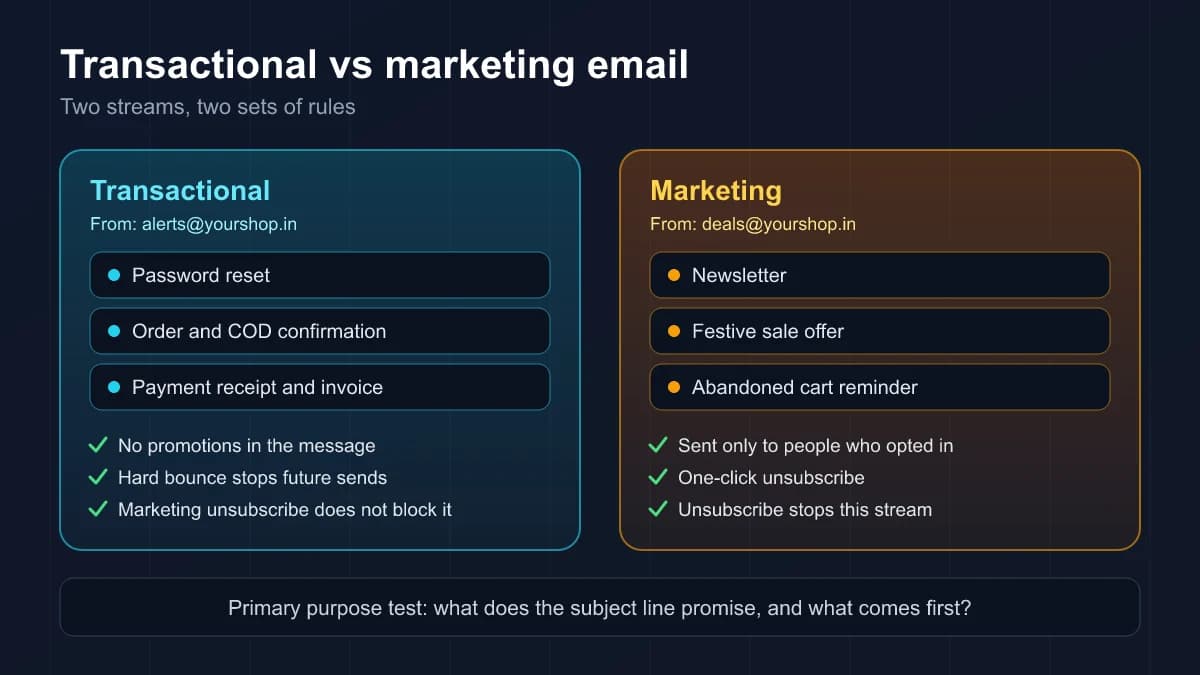
A transactional email completes or updates something the recipient already started with you, such as a password reset, an order confirmation or a payment receipt. A marketing email tries to sell, promote or bring someone back. That sounds obvious until you look at a real inbox, where a shipping update carries a discount banner and an "important account update" turns out to be a sale.
Getting the label right affects three things:
- The law. Commercial email rules such as the US CAN-SPAM Act exempt purely transactional messages from most of their requirements, but only when the message really is transactional.
- Unsubscribe handling. Google and Yahoo require bulk senders to offer one-click unsubscribe on marketing and promotional mail, and both say transactional mail is excluded from that requirement.
- Delivery. Mailbox providers build a reputation for the way you send. When promotions and critical account mail share one sending identity, complaints about the first can drag down the second.
The outcome to avoid is a customer who can't log in because the password reset went to spam after a festive sale from the same address drew complaints. That is a design problem, and most of the fix is deciding which stream each message belongs to before you build it.
The primary purpose test
The clearest written test comes from the US Federal Trade Commission's CAN-SPAM compliance guide for business. Even if your customers are in India or the Gulf, it is a useful way to reason, because it asks what a reasonable recipient would see as the main point of the email.
The FTC treats a message as transactional or relationship mail when it consists only of content that:
- facilitates, completes or confirms a transaction the recipient has already agreed to;
- gives warranty, recall, safety or security information about something they bought;
- tells them about a change in the terms or features of their membership, subscription, account or other ongoing relationship, or a change in their standing in it;
- provides regular account balance information;
- provides information about employment or employee benefits;
- delivers goods or services they have already agreed to receive.
Two points from the same guide catch people out. First, the FTC says the law views these categories narrowly, so having a customer relationship does not make every email to that customer transactional. Second, when one email mixes both kinds of content, it counts as commercial if the subject line would lead the recipient to think it is an ad, or if the transactional part does not appear mainly at the beginning.
Your actual obligations depend on where your recipients are and on local law, so treat the FTC test as a well-documented way to think rather than legal advice for your market. Google makes a similar point in its sender FAQ: the distinction can vary by industry and regulation, and it is recipients, not Google, who decide what kind of message they received.
Sorting real messages
Here is how the test applies to emails that small businesses in India and the Gulf send every day.
Clearly transactional:
- Signup confirmation and email verification codes.
- Password resets and new-login alerts.
- Order confirmations, cash-on-delivery confirmations, shipping and delivery updates.
- Payment receipts, invoices and failed payment notices.
- Booking and appointment confirmations, and reminders for a booking the customer made.
- Notices about changes to the terms of an account or subscription the customer holds.
Clearly marketing:
- Newsletters, offers, festive sale announcements and product launches.
- Win-back emails, upgrade offers and "you might also like" messages.
- Abandoned cart reminders. Most senders treat these as marketing, and that is the safe choice: the customer has not agreed to a transaction yet, so the email is a nudge to buy.
Grey areas to decide once and write down:
- Review requests after a purchase. They follow a transaction but ask the customer for something new. Treating them as marketing, with an unsubscribe link, is the cautious choice.
- Renewal reminders. A plain notice that a subscription renews on a given date is account information. A renewal email built around an upgrade offer is marketing.
- Product education for new customers. Explaining how to use something the customer already paid for leans transactional. A sequence that pushes paid add-ons does not.
A one-page list of every message type and its stream saves you from arguing the same case each time someone adds a new email.
What about a small offer inside a receipt?
Plenty of advice, including our own guide to transactional emails that build customer trust, suggests adding a light recommendation to an order confirmation. Know the trade-off first. Google's sender guidelines say not to mix different types of content in the same message, and the example they give is exactly this one: don't include promotions in sales receipt messages. Under the FTC test, a promotional subject line, or a receipt that sits below an offer, turns the whole email commercial.
If you keep a cross-sell, keep it small, put it after the complete receipt, keep the subject line about the order only, and watch complaints. If you are unsure, send the recommendation later as a separate marketing email to people who agreed to receive marketing.
How to keep the two streams apart
Separation is not only for companies with dedicated IP addresses. Start with what the mailbox providers actually ask for:
- 1. Use one From address per category. Google recommends that messages of the same category share the same From address, and gives examples like a receipts address, a deals address and an alerts address. It also says that if you must send from more than one IP address, you should use a different one for each message type.
- 2. Separate the sending identity where you can. Yahoo advises against sending bulk or marketing mail from the IPs you use for transactional mail and alerts, and suggests segregating mail by IP or DKIM domain, because each carries its own reputation. A simple version is marketing from one subdomain and account mail from another, each properly authenticated. Our SPF, DKIM and DMARC guide covers the records.
- 3. Keep two suppression lists with different rules. A marketing unsubscribe should stop newsletters, not password resets or receipts. An address that hard bounces does not exist, so it should stop both. Our explainer on email bounce codes shows how to tell a permanent failure from a temporary one.
- 4. Put one-click unsubscribe on marketing mail. Google and Yahoo require it for promotional messages from bulk senders and exclude transactional ones. Yahoo adds that it won't decide for you which mail needs an unsubscribe link, and that if mail without one draws high complaint rates, adding a one-click option may be in your interest.
- 5. Review transactional templates for drift. Banners and offers creep into receipts over time. Check every few months and remove anything that isn't about the transaction.
- 6. Monitor each stream on its own. If password resets start bouncing or being deferred, you want to see it straight away, not averaged into a newsletter report.
How BestEmail separates the two
BestEmail keeps campaigns and transactional sending in separate parts of the product, with the boundaries above built in.
- Campaigns go only to subscribers whose status is active, and the dashboard's suppression list records unsubscribes, bounces, complaints and manual blocks with a reason. The features page covers the campaign side.
- The transactional API is a separate endpoint with its own API keys, which need a transactional scope. Each request sends one message to one recipient, can carry a tag for reporting, and accepts an Idempotency-Key header so a retry after a timeout doesn't send the same receipt twice. The transactional API documentation has the details.
- Separate suppression. The API checks its own transactional suppression list. A permanent rejection, such as an unknown mailbox, adds the address to that list automatically, and later transactional sends to it are refused instead of bouncing again. A marketing unsubscribe does not block a password reset.
- Sender identity. Mail goes out from your own domain only after its SPF, DKIM and DMARC records check out and BestEmail has confirmed the mail relay accepts that domain. Until then it is sent from a BestEmail address with your business name as the display name, and replies can go to your own reply-to address, so nothing leaves with a From address that would fail DMARC.
- Visibility. A message log and signed webhooks report what happened to each message: accepted, deferred, bounced, suppressed or failed. The log keeps metadata, not message bodies.
- Test first. Test keys run the full pipeline without delivering anything, and new live senders are switched on after a short review by the BestEmail team.
A quick checklist
- Every message type is listed with its stream: transactional, marketing, or a recorded grey-area decision.
- Transactional subject lines describe the transaction and nothing else.
- Receipts and alerts carry no promotions, or only a small item after the complete transactional content.
- Marketing and transactional mail use different From addresses, and ideally different subdomains.
- Marketing mail has one-click unsubscribe, and a marketing unsubscribe never blocks account mail.
- Hard bounces stop both streams.
- Each stream is monitored separately.
FAQ
Do transactional emails need an unsubscribe link?
The one-click unsubscribe requirement that Google and Yahoo set for bulk senders applies to marketing and promotional mail, not transactional mail. Under the FTC's guide, a purely transactional message is exempt from most CAN-SPAM provisions. Local law can differ, and a message that is really promotional needs an unsubscribe option whatever you call it.
Is an abandoned cart email transactional?
Usually not. The customer has not agreed to the transaction, so most senders treat cart reminders as marketing, send them only to people who can receive marketing, and include an unsubscribe link.
Can marketing and transactional emails come from the same domain?
They can, and many small businesses do. Use a different From address for each category, as Google recommends, and if you can, a separate subdomain or DKIM domain for each stream, as Yahoo suggests.
Is a welcome email transactional or marketing?
A message that confirms the signup or verifies the address is transactional. A follow-up series that introduces products and offers is marketing, even though it is triggered by the signup.
What happens if I label marketing mail as transactional?
The label doesn't change how recipients see it. If people think it is promotional, they will treat it that way, and spam complaints count against your sender reputation. Under the FTC's narrow reading, it may also count as commercial email that needs the full set of CAN-SPAM requirements.