
Quiet subscribers cost more than they look
An email re-engagement campaign is a short series sent to subscribers who have stopped interacting, asking them to come back or confirm they still want your emails. People who respond stay on your list. People who don't are moved out of your regular sends under a written rule, usually called a sunset policy.
Keeping every address is tempting. A bigger list looks like a bigger audience, and nobody enjoys removing people who once signed up. But mailbox providers judge you by how recipients react to your mail, and silence is a reaction too. Gmail, Yahoo and Outlook all say this in their own sender guidance:
- Yahoo says that sending email to users who are not reading it, or who report it as spam, will harm your delivery metrics and reputation. It suggests sending a reconfirmation email to inactive subscribers periodically.
- Google asks senders to periodically confirm that recipients want to stay subscribed, and to consider unsubscribing recipients who don't open or read their messages.
- Microsoft, in its guidance for high-volume senders to Outlook, recommends removing inactive or invalid addresses regularly, monthly or quarterly.
Timing matters as well. Many businesses in India and the Gulf send their biggest campaigns of the year around the festive season. A large send to a list full of people who stopped reading months ago is a burst of mail to disengaged recipients, which is the pattern Google's guidelines warn against when they advise sending to engaged users and avoiding sudden volume spikes. Running your clean-up a few weeks before that campaign means the big send goes to people who actually want it.
1. Define "inactive" without trusting opens
The classic rule is "hasn't opened in 90 days". It has a flaw. When an Apple Mail user turns on Mail Privacy Protection, Apple says senders can no longer see whether a message was opened. For those readers, open data stops telling you anything reliable, in either direction. Our guide to Apple Mail Privacy Protection and open rates explains why.
Build your definition from actions that mean something:
- A click on any email.
- A purchase, booking, login or reply recorded in your store, CRM or inbox.
- A form submission or event registration.
- Customer status. Someone who bought last month and never clicks is still a customer.
Then choose the time window from your own buying cycle, not from someone else's template. A grocery list that mails every week can judge inactivity quickly. A software company mailing monthly needs longer, and a property developer whose buyers decide over many months needs longer still. A practical method: find the longest normal gap between two meaningful actions for a typical customer, and set the window comfortably beyond it. Write the number down. A rule that only lives in someone's head gets applied once and forgotten.
Leave new subscribers out of the check. Someone who joined three weeks ago and hasn't clicked yet isn't inactive, just new. Only people who joined before the start of your window should be judged.
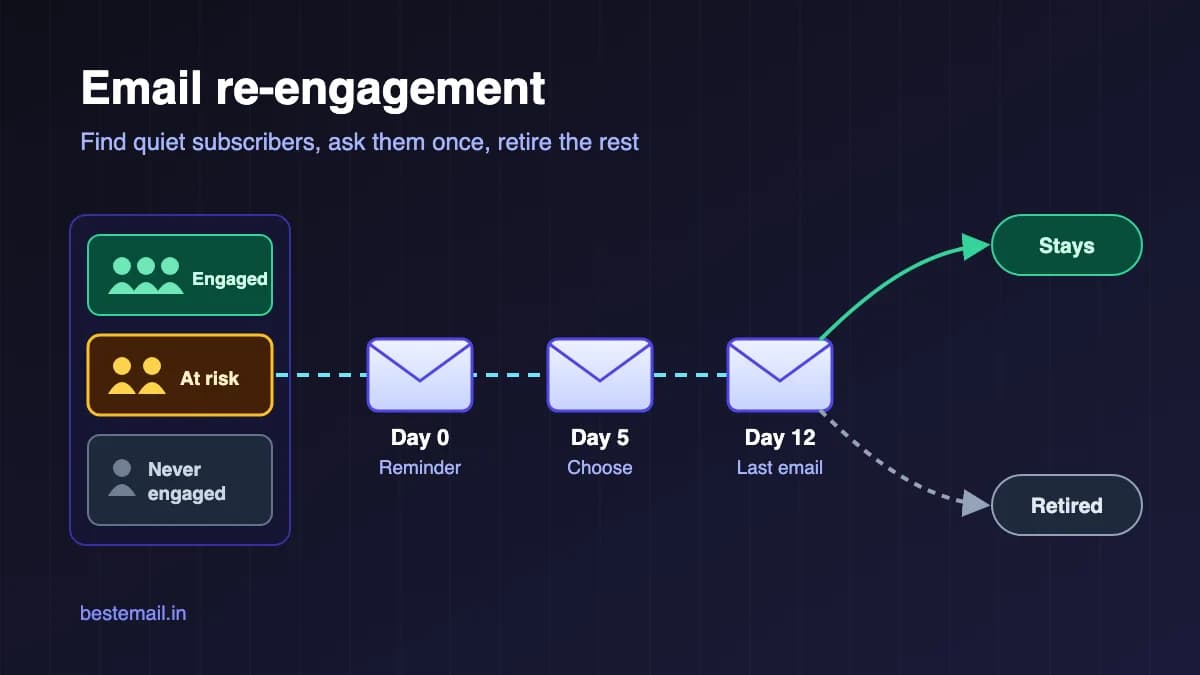
2. Sort the list into three groups
- Engaged: at least one meaningful action inside the window. They stay on your normal programme.
- At risk: no action inside the window, but some activity before it. This is the group a re-engagement campaign is for.
- Never engaged: joined before the window and has no recorded action at all. Check where these addresses came from before you email them. If they came from an old import, a trade-show list or a source nobody can explain, a re-engagement email can do more harm than good. Quietly retiring them is often the safer choice.
Bounced and unsubscribed addresses are not part of this exercise. They should already be suppressed. If they aren't, fix that first. Our guide to email bounce codes explains which bounces mean "remove now".
3. Write a short win-back series
Three emails over roughly two weeks suits most lists. More emails to people who are already ignoring you mostly adds complaint risk.
Email 1: A useful reminder (day 0). Remind them who you are and why they joined, then give them something worth clicking: your best recent guide, what has changed since they last visited, or a product they looked at before. Keep it short, with one main link.
Email 2: Ask what they want (around day 5). Offer choices instead of a single "come back" button. For example: keep everything, get less (a monthly round-up), or hear only about one topic. Every choice is a click, and a click is the signal you were missing. If you don't have a preference page, separate links that each tag the subscriber do the same job.
Email 3: The honest last email (around day 12). Say plainly that you will stop emailing unless they click to stay. Make the stay link the most visible thing in the message, keep the unsubscribe link easy to find, and skip the guilt. A subject line such as "Should we stop emailing you?" works because it is true. Don't fake urgency or threaten to "delete an account" that doesn't exist.
A discount can win back lapsed buyers in a shop, but only include one if it fits your margins and your normal promotions. If the only reason someone clicks is a one-off discount, you have kept an address, not a reader. For wording that doesn't rely on tricks, see subject lines that get opened.
A few rules for the whole series:
- Use the same From name and address as your normal email, so people recognise you.
- If the at-risk group is large compared with your usual sends, send in batches over several days rather than all at once.
- Take anyone who clicks, buys or replies out of the series straight away and move them back to engaged.
- Make unsubscribing easy. Yahoo asks bulk senders to honour unsubscribes within two days, and Google requires one-click unsubscribe for marketing mail from senders of more than 5,000 messages a day.
4. Retire non-responders and keep a record
When the series ends, anyone who hasn't responded leaves your regular sends. You have two options:
- Suppress the address. Keep it with a clear reason, such as "sunset, October 2026", so nobody mails it again by accident.
- Delete the contact. Remove it entirely if you have no business reason to keep the data.
Whichever you choose, write down what you did and when. Then keep old spreadsheets and exports out of future imports, because re-importing an old file is an easy way for retired addresses to come back.
Finally, turn the one-off clean-up into a sunset policy: a short written rule that runs the same check on a schedule. Microsoft's monthly-or-quarterly suggestion is a sensible rhythm for most small senders.
5. Running it in BestEmail
Here is how the steps above map to features in BestEmail.
- Tag the at-risk group. On the Subscribers page you can filter by status and tag, select all the filtered results and add a tag to them in one step. Use the activity data from your store or CRM to decide who belongs in the group, then tag those contacts (for example "winback").
- Keep new signups out. Create a segment with two rules, "Has tag: winback" and "Joined before" the start of your window, combined with ALL. Campaigns only go to contacts whose status is active.
- Start from a layout. The template library has a "We Miss You" design in the Re-engagement category. It includes a sample offer block, so edit or remove the offer to match what you actually provide.
- Let people choose to stay. Point the "keep me subscribed" link in emails 2 and 3 at a short BestEmail form. Then create an automation with the "Form Submitted" trigger for that form and a "Remove Tag" action for "winback". Anyone who confirms leaves the win-back group on their own. If someone replies or buys instead, remove the tag from their profile.
- Retire the rest. After the last email, filter the Subscribers page by the "winback" tag to see who is left. You can delete them in bulk, or add addresses to the Suppression list with a reason. The Suppression list also shows everyone who has unsubscribed, bounced or complained, which makes it a useful check before any big send.
One caution: adding a contact again by hand or through the API can set them back to active, so keep old lists that contain retired addresses out of future imports.
If you are planning a big seasonal send, pair this clean-up with the Google Postmaster Tools checklist so you can watch your spam rate before and after. You can see everything BestEmail includes on the features page and compare plans on pricing.
A quick sunset checklist
- Inactivity is defined by clicks, purchases, replies or logins, not opens alone.
- The window matches your buying cycle and is written down.
- New subscribers are excluded from the check.
- Never-engaged addresses from unknown sources are retired, not mailed.
- The win-back series is three emails, with an honest last email and a visible unsubscribe link.
- People who respond move back to engaged straight away.
- Non-responders are suppressed or deleted, and the date and reason are recorded.
- The check runs again next month or next quarter.
FAQ
How long should I wait before calling a subscriber inactive?
Longer than the normal gap between meaningful actions for your typical customer. A weekly newsletter or grocery list can use a short window; a business with a long buying cycle needs a much longer one. Pick a number from your own data and write it down.
How many emails should a re-engagement campaign have?
Usually three, spread over about two weeks: a useful reminder, a choice of what they want, and an honest last email. Sending more to people who are already ignoring you mostly raises the risk of spam complaints.
Should I delete inactive subscribers or just stop emailing them?
Either works, as long as they leave your regular sends. Suppressing keeps a record so the address isn't mailed again by mistake. Deleting is cleaner if you have no reason to keep the data. Record the decision and the date either way.
Can I still use opens to find inactive subscribers?
Treat opens as a weak signal. With Apple Mail Privacy Protection turned on, Apple says senders can't see whether a message was opened, so open data for those readers is unreliable. Clicks, purchases, replies and logins are much better evidence.
What is the difference between a re-engagement campaign and a sunset policy?
The re-engagement campaign is the series of emails that tries to win people back. The sunset policy is the standing rule that decides who gets that series, when, and what happens to people who don't respond.