
The first week decides how a subscriber reads you
A welcome email series is the short run of emails a new subscriber receives right after joining your list. It is the only point in the relationship when the person has just asked to hear from you. Every email after it competes with their memory of why they signed up.
Most advice on the topic goes straight to a template: five emails, seven emails, a discount in the first one. Templates are a fine starting point, but they skip the decisions that make a series work for your business. How many emails you need depends on what the series has to achieve. How far apart they go depends on how quickly your buyers decide. And the series needs exit rules, or it will keep pitching people who already bought, or who quietly stopped reading days ago.
This guide walks through those decisions in order. If you are new to automation, start with getting started with email automation and come back when you are ready to build the welcome flow properly.
1. Decide the job before you count the emails
Write one sentence that says what a subscriber should know or do by the end of the series. For example:
- A shop: "Has seen our three best-selling categories and knows how delivery and returns work."
- A software product: "Has connected their first data source and sent a test."
- An agency or consultant: "Understands the problems we solve and has booked a call or downloaded the case study."
- A newsletter: "Knows what arrives, how often, and has replied to us at least once."
Then list the obstacles between a brand-new subscriber and that outcome. Maybe they do not trust you yet. Maybe they do not know which product fits them, or they are worried about setup effort. Each real obstacle is a candidate email. That gives you a number that fits your business instead of one borrowed from someone else's.
For most small businesses this lands between three and six emails. Fewer than three rarely gets past "thanks for joining". More than six usually means two different jobs have been squeezed into one series, such as onboarding and a sales push. Those work better as two sequences connected end to end, which section 6 covers.
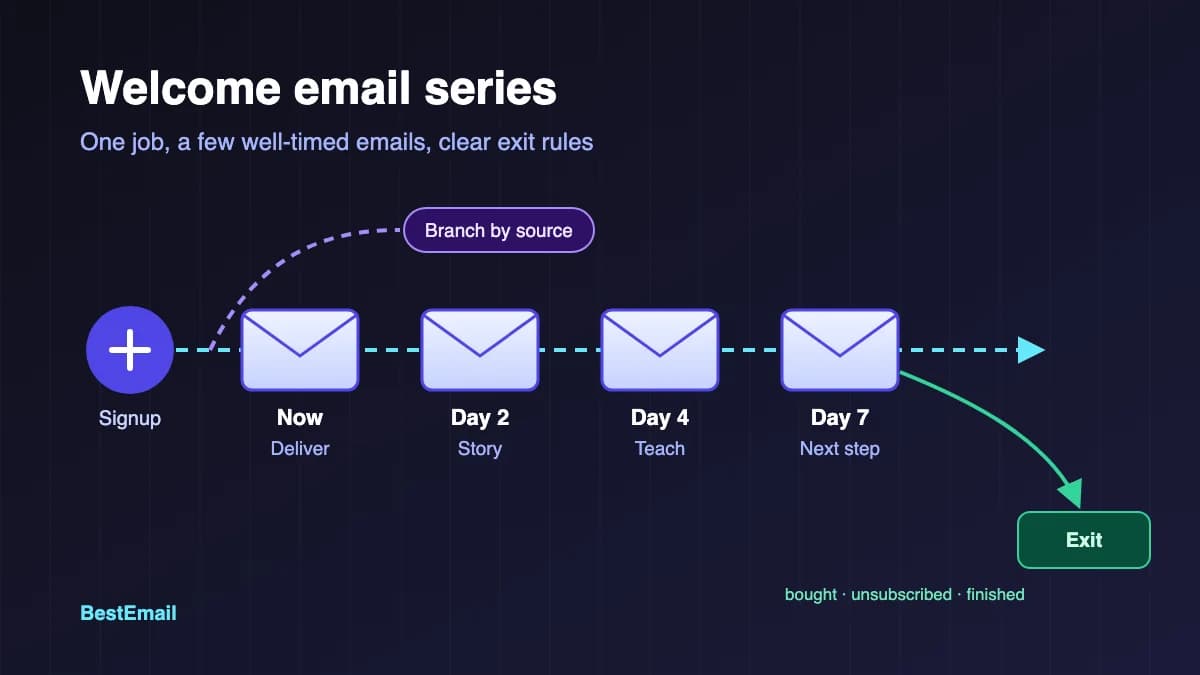
2. A dependable shape: four emails
If you want a starting structure, this four-part shape suits a lot of small businesses. Rename and reorder it to match your job sentence.
Email 1: Deliver and set expectations (immediately). Send what the signup form promised, whether that is a guide, a discount code or the first issue. Then say what comes next and how often. Yahoo's sender guidance asks senders to set expectations clearly at signup and to honour the frequency people signed up for. This first email is where you show you meant it. Give it one clear link.
Email 2: Who you are, with proof (one to two days later). Explain who you help and show one concrete result. A named customer quote, a before and after, or a short worked example does more than a paragraph of adjectives.
Email 3: The most useful thing you know (two to three days later). Teach something the subscriber can act on without buying anything: a sizing guide, a setup checklist, the mistake you see most often in your field. This is the email that earns the right to ask for something.
Email 4: One clear next step (two to four days later). Make one specific offer or request. Book a demo, choose a plan, use the code before it expires. Tell people what happens after they click. If there is a deadline, state it plainly and keep to it.
Shops often add a "how delivery and returns work" email between 3 and 4. B2B senders often add a short email that answers the most common objection, such as price, migration effort or data handling.
3. Timing: tie the gaps to the buying cycle
Send the first email as soon as someone subscribes. They are expecting it, they may still have your form open, and a slow first email is the quickest way to look broken.
After that, match the spacing to how fast your buyers make decisions:
- Impulse or low-price purchases: shorter gaps, often a day apart, with the series finished inside a week.
- Considered purchases such as software, courses or professional services: two to four days apart, spread over roughly two weeks.
- Newsletters: often one or two welcome emails, then the regular schedule takes over.
Two practical rules help. First, avoid stacking the series on top of your regular campaigns. A new subscriber who gets a welcome email and a promotional newsletter on the same morning cannot tell which one matters. Second, send at a time of day that fits your audience's routine, not whenever the automation happens to fire.
4. Branch by where people signed up
Someone who joined from your pricing page and someone who downloaded a free checklist are in different places. Sending both the same four emails throws away the most useful signal you have.
Keep branching simple. Record the signup source as a tag or field, then run one shared series with small differences, or two short series. Common splits:
- Lead magnet vs. general signup. The lead magnet group gets the download first, then content that builds on it.
- Customer vs. prospect. Someone who joined at checkout does not need a sales pitch. They need delivery, setup and support details.
- Region or language, when your offer, prices or seasonal calendar differ in a meaningful way.
Before building branches, check that your form actually captures what you need. The email signup form QA checklist covers hidden fields, tags and test submissions.
5. Write the exit rules before the subject lines
Exit rules stop a welcome series from doing harm. Decide them up front:
- Unsubscribed: they stop receiving the series straight away. This should never depend on someone remembering to check a list.
- Converted: if the series exists to win a purchase or booking, anyone who completes it should leave and move to a customer or onboarding flow.
- Already a customer: do not welcome existing customers as if they were strangers.
- Finished: when the last email goes out, move people to the right next step: regular campaigns, a product education sequence, or a segment for people who never engaged.
Consent sits underneath all of this. Google's sender guidelines tell senders to make sure recipients opt in, to confirm each recipient's address before subscribing them, and to make unsubscribing easy. Yahoo recommends sending an email that asks new subscribers to click to confirm their opt-in. A welcome series that only reaches confirmed, willing subscribers builds the relationship and protects your sending reputation at the same time.
6. How to build it in BestEmail
BestEmail keeps the emails separate from the logic that decides who receives them, so the plan above maps onto it cleanly.
- Sequences hold the emails. Each step has its own subject and body, a delay in days and hours after the previous step, and an optional time of day to send.
- Automations decide who enters. An automation can fire when a subscriber is created, when a form is submitted or when a tag is added, and its action can enroll that person in a sequence. Optional conditions narrow it further, such as a specific tag, signup source or custom field value. That is how you build the branches from section 4.
- Exits can be automated too. An automation can unsubscribe a person from a specific sequence, so a tag you add when someone buys or books can end their welcome series early.
- Unsubscribed people drop out. Before each step is sent, BestEmail checks the subscriber's status and cancels the enrollment if they are no longer active.
- Sequences can be chained. When someone finishes a sequence, a "Sequence Completed" trigger can start another automation, for example to add a tag or enroll them in the next sequence.
- Personalisation has a fallback. Merge tags such as {{first_name}} fall back to "there" when the field is empty, so a missing name never shows up as "Hi ,".
Each sequence shows how many people are active, completed or cancelled, and how many times each step has been sent, which is enough to see where people pile up or drop out. You can compare what each plan includes on the BestEmail pricing page and see the full list on BestEmail features.
7. Measure clicks and outcomes, not opens
Open rates are a weak signal for a welcome series. Apple Mail Privacy Protection loads email content in the background, which can record an open whether or not anyone read the message. Our guide to Apple Mail Privacy Protection and open rates explains what to use instead.
For a welcome series, track:
- Clicks per email, especially on the one link that matters in each step.
- The outcome in your job sentence: purchases, bookings, activations or replies within a fixed window after signup.
- Unsubscribes and complaints per email. A spike on one step usually means it broke the promise made in email 1.
- Where people stop. If many people never reach the last step, the gap before it may be too long, or an earlier email may not be earning its place.
Change one thing at a time and give each change enough new subscribers to judge it fairly. If you are rewriting subject lines, subject lines that get opened has wording ideas, but judge the result on clicks and outcomes.
A short pre-launch checklist
- The job sentence is written, and every email maps to a real obstacle.
- The first email sends immediately and delivers what the form promised.
- The frequency stated in email 1 matches the actual schedule.
- The signup source is captured, and every branch has been tested with a real address.
- Exit rules are in place for unsubscribes, conversions and existing customers.
- People who finish have a defined next step.
- Every email has one main link, a visible unsubscribe link and a reply address that a person reads.
FAQ
How many emails should a welcome series have?
Enough to clear the obstacles between signup and the outcome you want. For most small businesses that is three to six emails. If you need more, check whether you have combined two jobs that would work better as separate sequences.
When should the first welcome email be sent?
Immediately after signup. The subscriber is expecting it, and a delay makes the form look broken. Spacing between the later emails can follow your buying cycle.
Should a welcome email include a discount?
Only if the signup form promised one, or if a discount is how you normally win first orders. A discount that was not promised trains new subscribers to wait for offers. Useful content or a clear next step often works just as well.
What is the difference between a welcome email and a welcome series?
A welcome email is a single message. A welcome series is a planned run of emails with its own timing, branches and exit rules, built to move a new subscriber towards one specific outcome.
Should existing subscribers get a new welcome series?
Usually not. A welcome series is written for people who have just joined. For existing subscribers, send a one-off campaign that introduces anything new, and keep the series for new signups.